
OpenCV-9 calibration
by
본 포스팅은 opencv doc 문서, 여기, 여기를 참고하여 만들었습니다.
Calibration overview
Calibration이란 실제 세계의 3D 포인트와 보정된 카메라로 캡처한 이미지의 해당 2D 정보의 관계를 결정하는데 필요한 카메라의 정보, 즉 parameter를 추정하는 과정이라 할 수 있다.
카메라의 parameter로는 intrinsic, extrinsic 두 종류가 있고 이는 뒤에 자세히 설명할 것이다.
카메라 calibration이란 다시 말해 Real world의 3D포인트와 촬영한 2D정보를 이용하여 3by3 행렬인 intrinsic(K), extrinsic 회전행렬(R) 그리고 열행렬(벡터) 인 transpose 행렬을 찾아 그 행렬의 element인 parameter를 찾는 과정이라 할 수 있다.
따라서 카메라 calibration의 알고리즘의
입력은 2D 이미지 좌표와 3D world coordinate 가 주어진 포인트가 있는 이미지 모음,
출력은 3 × 3 카메라 내장 매트릭스, 각 이미지의 회전 및 변환 이라 할 수 있다.
Calibration의 필요성
3차원의 점들이 이미지 상에서 어디에 맺히는지는 기하학적으로 생각하면 영상을 찍을 당시의 카메라의 위치 및 방향에 의해 결정된다.
더불어 실제 이미지는 사용된 렌즈, 렌즈와 이미지 센서와의 거리, 렌즈와 이미지 센서가 이루는 각 등 카메라 내부의 기구적인 부분에 의해서 크게 영향을 받는다.
따라서, 3차원 점들이 영상에 투영된 위치를 구하거나 역으로 영상좌표로부터 3차원 공간좌표를 복원할 때에는 이러한 내부 요인을 제거해야만 정확한 계산이 가능해지고 이 parameter 값을 찾는 것을 calibration이라 한다.
Calibration step
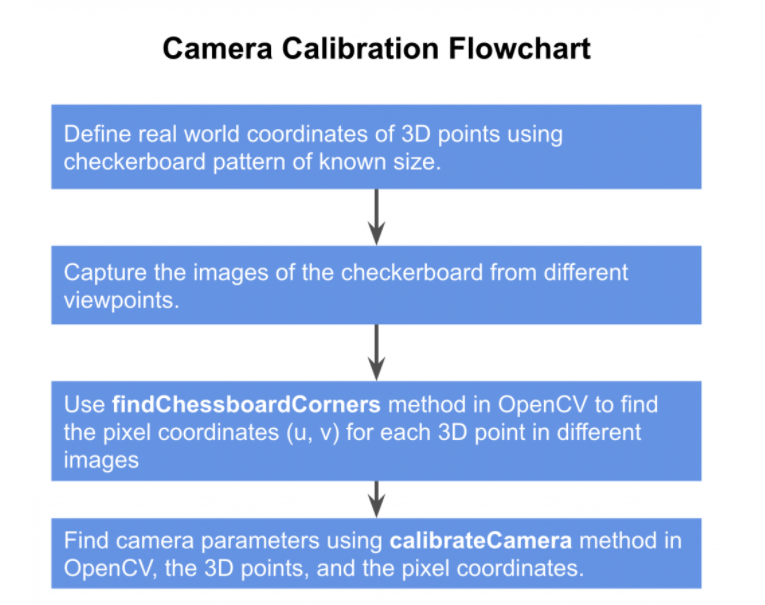
STEP 1)바둑판 패턴으로 Real Coordinate 좌표 정의
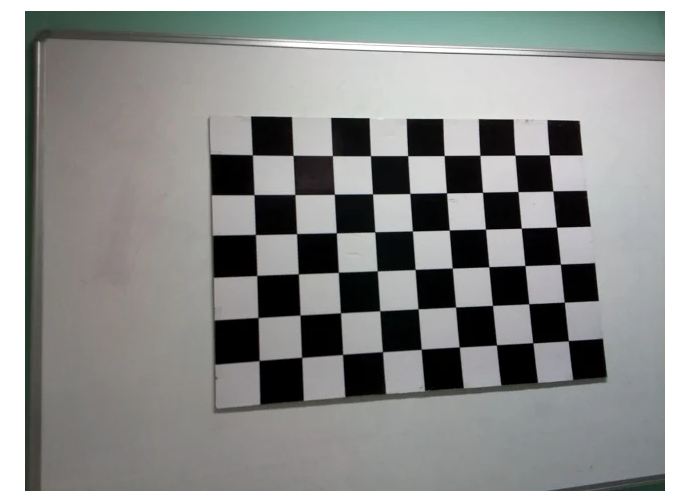
X, Y, Z축을 갖는 world coordinate를 fix 한다.
Z = 0 이고, 좌표를 정할때 (0, 0)을 기준으로 그 점을 참조하여 어느 위치에 있는지 나타낸다.
Calibration에 바둑판 패턴이 주로 사용되는 이유는 모서리에 바둑판 선의 교차점이 존재하기 때문이라 한다.
STEP 2)다양한 시점에서 바둑판의 2D상의 이미지들 캡처
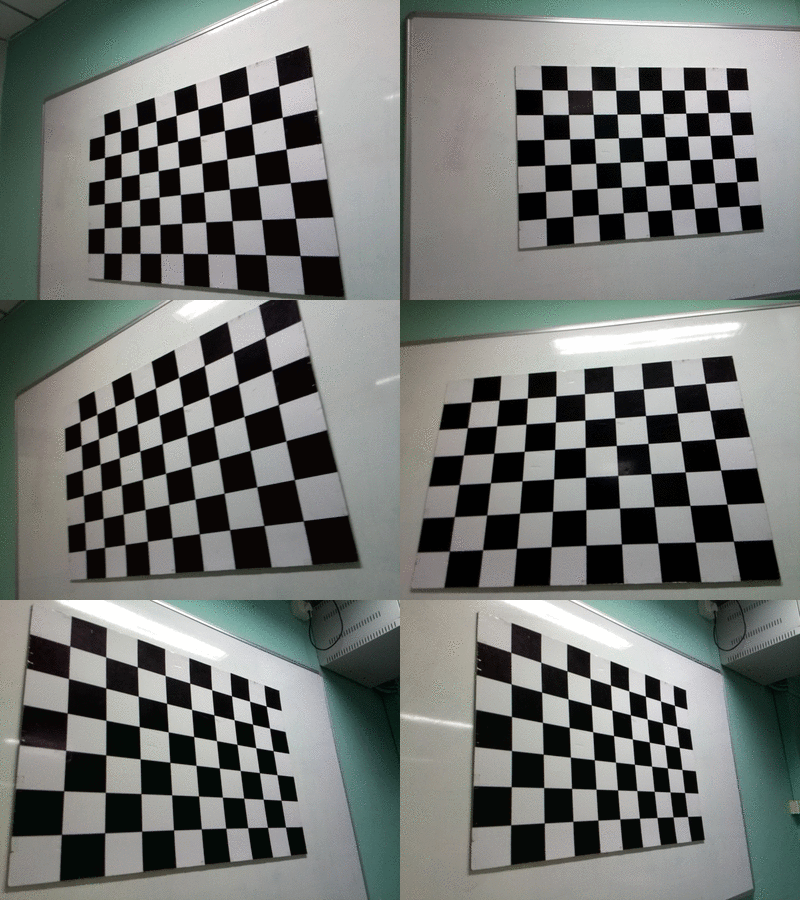
바둑판을 정적으로 유지하고 카메라를 이동하여 바둑판의 여러 이미지를 찍는 과정이다.
또는 카메라를 일정하게 유지하고 다른 방향으로 바둑판 패턴을 촬영하는 방법도 있다.
나는 후자룰 택했다.
STEP 3)바둑판의 2D 좌표 찾기
step 2 에서 얻은 2D상의 이미지들과, step 1에서 정의한 world coordinate 위치를 구했다.
step 3에선 이미지에서 바둑판 모서리의 2D 픽셀 위치를 찾는다.
cpp 에선 findChessboardCorners 함수를 사용한다.

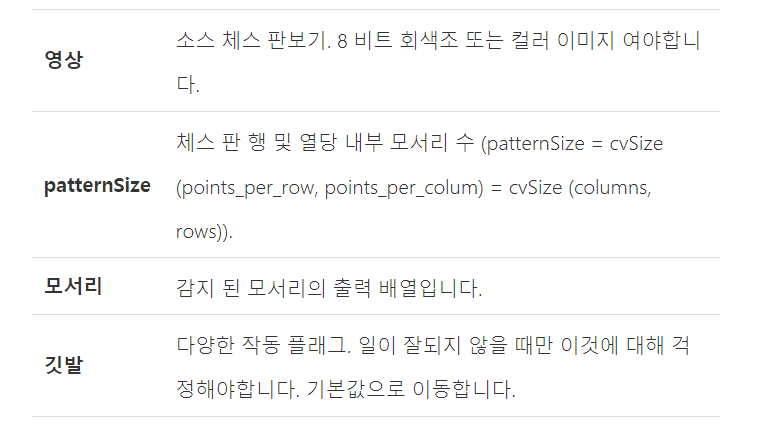
findChessboardCorners 함수는 패턴을 찾았다면 1, 아니면 0 을 리턴하고, 코드상에선 success에 할당하여 코딩하였다.
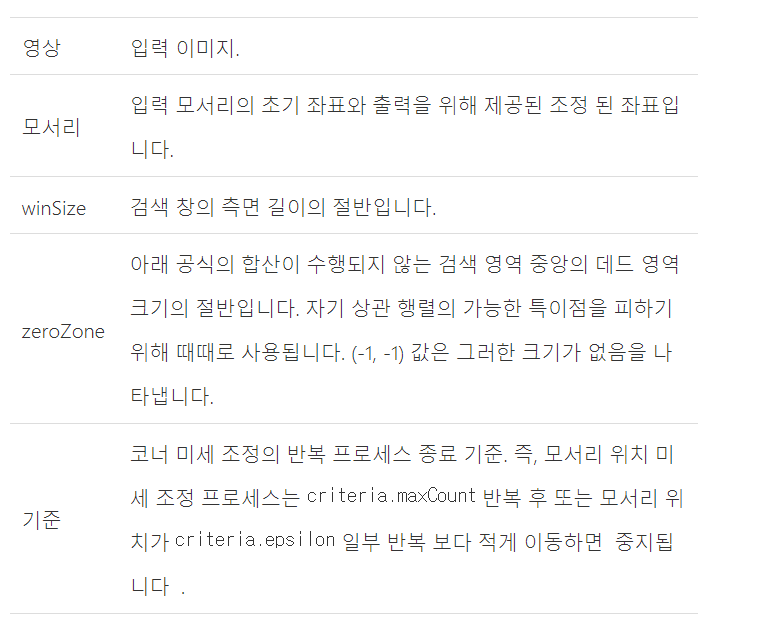
한 iteration에 대해 바둑판 모서리 픽셀의 위치를 찾았다면, 이제 iteration을 반복하며 알고리즘을 통해 좀 더 정확한 모서리 픽셀의 위치를 찾는다.
cornerSubPix 함수를 이용하여, 원본 이미지(calibration 되기 전)와 그 모서리(corner)의 위치를 가져와 원본의 모서리 위치에 대해 가장 적합한 corner를 예측한다.
하위 픽셀 수준의 정확도로 코너의 위치를 얻기에 cornerSubPix라 하는데, 하위 픽셀이 무엇을 뜻하는지는 모르겠다.

STEP 4)Calibration (parameter 값 구하기)
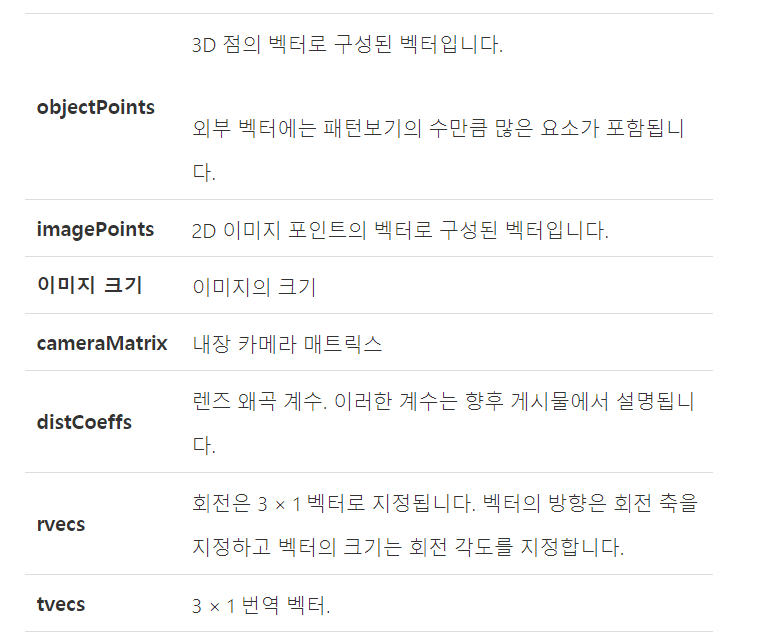
앞서 구한 Word coorinate의 3D좌표와, 촬영한 2D 이미지의 좌표를 인자로 주어 calibrateCamera 함수를 사용한다.

Calibration parameter
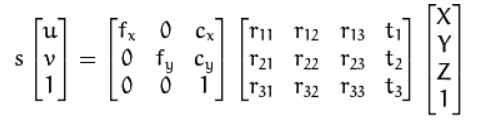
| World cordinate상의 3D 좌표를 X, Y, Z라 하고, *[R | t]*는 월드 좌표계를 카메라 좌표계로 변환시키기 위한 회전/이동변환 행렬이며 A는 intrinsic camera matrix 라 한다. |
말했듯이 World 좌표와 2D 영상좌좌표인 (u, v)를 주어 가운데 행렬들의 element 값을 구하는 것이 parameter 를 구하는 것이며 calibration이라 할 수 있다.
| *[R | t]*를 extrinsic parameter라 하고, 그 앞단의 행렬을 A라 하고 intrinsic parameter이라 한다. |
파라미터는 카메라의 설치 높이, 방향(팬, 틸트) 등 카메라와 외부 공간과의 기하학적 관계에 관련된 파라미터이며 내부 파라미터는 카메라의 초점 거리, aspect ratio, 중심점 등 카메라 자체의 내부적인 파라미터 이다.
Intrinsic parameter
행렬 A를 보면 알 수 있듯이 Intrinsic parameter에는 3 가지 정보가 있다.
-
초점거리 (fx, fy)
-
광학 중심(cx, xy)
-
비대칭 계수(1)
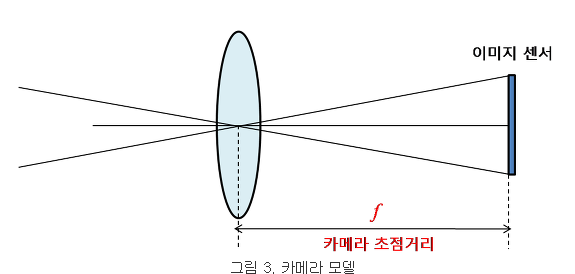
초점거리란 렌즈 중심과 이미지 센서와의 거리를 의미한다.
카메라 모델에서는 초점 거리를 픽셀 단위로 표현하고, 이는 기하학적 해석을 용이하게 하기 위해서라고 한다.
예를 들어, 이미지 센서의 셀(cell)의 크기가 0.1 mm이고 카메라의 초점거리가 f = 500 pixel이라고 하면 이 카메라의 렌즈 중심에서 이미지 센서까지의 거리는 이미지 센서 셀(cell) 크기의 500배 즉, 50 mm라는 의미한다.
이미지 센서의 물리적인 셀 간격이 가로 방향과 세로 방향에 따라 다를 수 있기에, fx, fy로 구분하여 나타낸다.
fx는 초점 거리가 가로 방향 셀 크기의 몇 배 인지를 나타내고 fy는 초점 거리가 세로 방향 센서 셀 크기의 몇 배인지를 나타낸다.
f = fx = fy리 놓아도 무방하다고 한다.
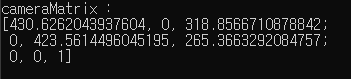
[0][0] 과, [1][1] 비교.. 거의 같다.
이미지 해상도를 1/2로 낮추면, 셀의 가로, 세로는 두 배가 되고 그에 따라 초점 거리는 1/2배가 됨을 알 수 있다.
다음은 광학 중심이다.
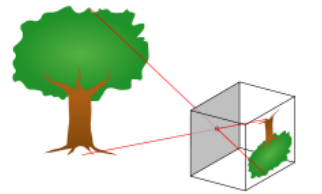
(가운데 점이 핀홀이다.)
3D 공간과 2D 이미지 평면 사이의 기하학적 투영(projection) 관계를 매우 단순화시켜주는 모델을 핀홀 카메라 모델이라 하고, 핀홀 카메라 모델에서 모든 빛은 한 점(초점)을 직선으로 통과하여 이미지 평면(센서)에 투영된다.
그 한 초점은 렌즈의 중심(핀홀)에 해당된다.
그리고 광학 중심이란, 렌즈의 중심에서 이미지 센서에 내린 수선의 발의 좌표를 의미한다.
따라서 렌즈와 이미지 센서가 수평이 어긋나면 광학 중심과 렌즈의 영상의 중심이 어긋난 값을 가질 것이다.
모든 기하학적 해석은 이 광학중심을 이용하여 이루어진다.
세 번째 Intrinsic paramter 는 비대칭 계수(skew coefficient) 이다.
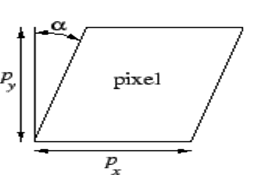
이미지 센서의 cell array의 y 축이 기울어진 정도를 나타내는데, 요즘 카메라들은 거의 skew 에러가 없기에 비대칭 계수는 고려하지 않는다고(skew coefficient = 0) 한다.
Extrinsic parameter
외부 파라미터는 카메라 좌표계와 월드 좌표계 사이의 변환 관계를 설명해주고, 두 좌표계 사이의 방사형 왜곡에 대한 변환, 접선형 왜곡에 대한 변환을 나타내는 두 파라미터가 있다.
외부 파라미터는 내부 파라미터와 달리 카메라 고유의 파라미터 값을 갖는게 아니라 월드 좌표계의 정의 상태, 카메라 위치 설정에 따라 달라진다.

방사형((Radial) 왜곡에 대한 변환 이다.
방사형 왜곡은 영상 센서의 중심으로부터 멀어질수록 많이 발생하고, 이를 테일러 급수를 이용해 몇 개의 항으로 표현 한 것이다.
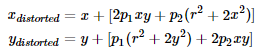
다음은 접선형(tangential) 왜곡에 대한 변환 이다.
카메라 제조 과정에서 생기는 왜곡인데, 이는 렌즈와 영상의 평면이 완벽히 이루어 지지 않아 생기는 왜곡이라 한다.
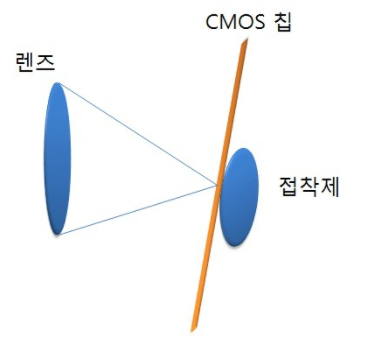
(접선형 왜곡이 생기는 이유)

Distortion coefficient란 방사형 왜곡과 접선형 왜곡의 파라미터들을 5x1 행렬로 표현 한 것이다.
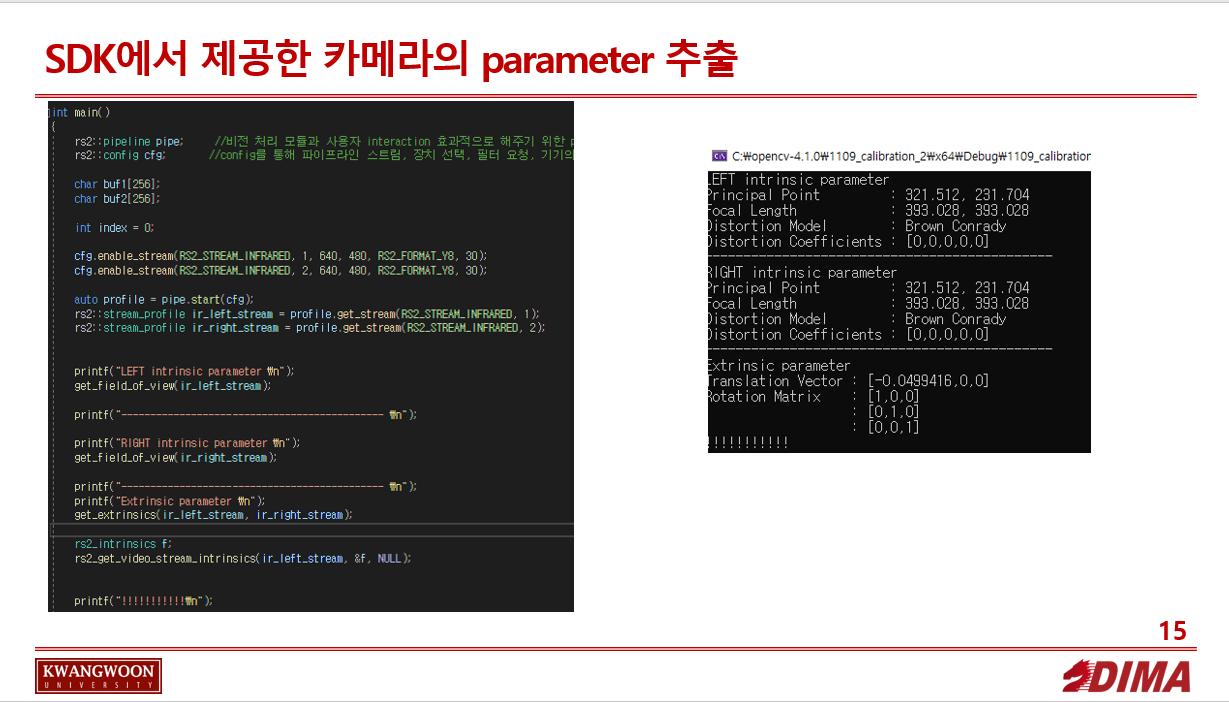
CODE - 이미지 뽑기
#define _CRT_SECURE_NO_WARNINGS

#include <librealsense2/rs.hpp>
#include <opencv2/opencv.hpp>
#include <iostream>


using namespace std;
using namespace cv;

static void get_field_of_view(const rs2::stream_profile& stream);
static void get_extrinsics(const rs2::stream_profile& from_stream, const rs2::stream_profile& to_stream);


int main()
{
    rs2::pipeline pipe;     //비전 처리 모듈과 사용자 interaction 효과적으로 해주기 위한 pipeline 선언,  카메라 구성 및 스트리밍, 비전 모듈 트리거링 및 스레딩을 추상화
    rs2::config cfg;       //config를 통해 파이프라인 스트림, 장치 선택, 필터 요청, 기기의 파이프 라인 요구 사항과 충돌이 없는지 테스트 가능

    char buf1[256];
    char buf2[256];

    int index = 0;

    cfg.enable_stream(RS2_STREAM_INFRARED, 1, 640, 480, RS2_FORMAT_Y8, 30);
    cfg.enable_stream(RS2_STREAM_INFRARED, 2, 640, 480, RS2_FORMAT_Y8, 30);

    auto profile = pipe.start(cfg);
    rs2::stream_profile ir_left_stream = profile.get_stream(RS2_STREAM_INFRARED, 1);
    rs2::stream_profile ir_right_stream = profile.get_stream(RS2_STREAM_INFRARED, 2);


    printf("LEFT intrinsic parameter \n");
    get_field_of_view(ir_left_stream);

    printf("--------------------------------------------- \n");

    printf("RIGHT intrinsic parameter \n");
    get_field_of_view(ir_right_stream);

    printf("--------------------------------------------- \n");
    printf("Extrinsic parameter \n");
    get_extrinsics(ir_left_stream, ir_right_stream);

    rs2_intrinsics f;
    rs2_get_video_stream_intrinsics(ir_left_stream, &f, NULL);


    printf("!!!!!!!!!!!\n");


    while (1)
    {

        // Camera warmup - dropping several first frames to let auto-exposure stabilize
        rs2::frameset frames;       //frameset 클래스로 frames이란 객체 생성

        frames = pipe.wait_for_frames();        //새 프레임세트를 사용할 수 있을 떄 까지 기다리기. 읽지않은 최신 프레임세트를 가져옴, 함수가 호출되지 않은 동안 생성된 장치 프레임은 삭제

        //Get each frame
        rs2::frame ir_frame_left = frames.get_infrared_frame(1);        //IR 형식의 첫 번쨰 프레임 검색
        rs2::frame ir_frame_right = frames.get_infrared_frame(2);


        Mat IR_left(Size(640, 480), CV_8UC1, (void*)ir_frame_left.get_data());
        Mat IR_right(Size(640, 480), CV_8UC1, (void*)ir_frame_right.get_data());


        imshow("VIDEO_PLAYER_L", IR_left);
        imshow("VIDEO_PLAYER_R", IR_right);

        if (waitKey(10) == 97)
        {
            sprintf(buf1, "left_%d.jpg", index);
            sprintf(buf2, "right_%d.jpg", index);

            cout << buf1 << endl;
            cout << buf2 << endl;

            imwrite(buf1, IR_left);
            imwrite(buf2, IR_right);

            index++;
        }


        else if (waitKey(10) == 27) break;       //10ms 내에 키 입력되면 break
    }


    return 0;
}


static void get_field_of_view(const rs2::stream_profile& stream)
{
    // A sensor's stream (rs2::stream_profile) is in general a stream of data with no specific type.
    // For video streams (streams of images), the sensor that produces the data has a lens and thus has properties such
    //  as a focal point, distortion, and principal point.
    // To get these intrinsics parameters, we need to take a stream and first check if it is a video stream
    if (auto video_stream = stream.as<rs2::video_stream_profile>())
    {
        try
        {
            //If the stream is indeed a video stream, we can now simply call get_intrinsics()
            rs2_intrinsics intrinsics = video_stream.get_intrinsics();

            auto principal_point = std::make_pair(intrinsics.ppx, intrinsics.ppy);
            auto focal_length = std::make_pair(intrinsics.fx, intrinsics.fy);
            rs2_distortion model = intrinsics.model;

            std::cout << "Principal Point         : " << principal_point.first << ", " << principal_point.second << std::endl;
            std::cout << "Focal Length            : " << focal_length.first << ", " << focal_length.second << std::endl;
            std::cout << "Distortion Model        : " << model << std::endl;
            std::cout << "Distortion Coefficients : [" << intrinsics.coeffs[0] << "," << intrinsics.coeffs[1] << "," <<
                intrinsics.coeffs[2] << "," << intrinsics.coeffs[3] << "," << intrinsics.coeffs[4] << "]" << std::endl;
        }
        catch (const std::exception& e)
        {
            std::cerr << "Failed to get intrinsics for the given stream. " << e.what() << std::endl;
        }
    }
    else if (auto motion_stream = stream.as<rs2::motion_stream_profile>())
    {
        try
        {
            //If the stream is indeed a motion stream, we can now simply call get_motion_intrinsics()
            rs2_motion_device_intrinsic intrinsics = motion_stream.get_motion_intrinsics();

            std::cout << " Scale X      cross axis      cross axis  Bias X \n";
            std::cout << " cross axis    Scale Y        cross axis  Bias Y  \n";
            std::cout << " cross axis    cross axis     Scale Z     Bias Z  \n";
            for (int i = 0; i < 3; i++)
            {
                for (int j = 0; j < 4; j++)
                {
                    std::cout << intrinsics.data[i][j] << "    ";
                }
                std::cout << "\n";
            }

            std::cout << "Variance of noise for X, Y, Z axis \n";
            for (int i = 0; i < 3; i++)
                std::cout << intrinsics.noise_variances[i] << " ";
            std::cout << "\n";

            std::cout << "Variance of bias for X, Y, Z axis \n";
            for (int i = 0; i < 3; i++)
                std::cout << intrinsics.bias_variances[i] << " ";
            std::cout << "\n";
        }
        catch (const std::exception& e)
        {
            std::cerr << "Failed to get intrinsics for the given stream. " << e.what() << std::endl;
        }
    }
    else
    {
        std::cerr << "Given stream profile has no intrinsics data" << std::endl;
    }
}


static void get_extrinsics(const rs2::stream_profile& from_stream, const rs2::stream_profile& to_stream)
{
    // If the device/sensor that you are using contains more than a single stream, and it was calibrated
    // then the SDK provides a way of getting the transformation between any two streams (if such exists)
    try
    {
        // Given two streams, use the get_extrinsics_to() function to get the transformation from the stream to the other stream
        rs2_extrinsics extrinsics = from_stream.get_extrinsics_to(to_stream);
        std::cout << "Translation Vector : [" << extrinsics.translation[0] << "," << extrinsics.translation[1] << "," << extrinsics.translation[2] << "]\n";
        std::cout << "Rotation Matrix    : [" << extrinsics.rotation[0] << "," << extrinsics.rotation[3] << "," << extrinsics.rotation[6] << "]\n";
        std::cout << "                   : [" << extrinsics.rotation[1] << "," << extrinsics.rotation[4] << "," << extrinsics.rotation[7] << "]\n";
        std::cout << "                   : [" << extrinsics.rotation[2] << "," << extrinsics.rotation[5] << "," << extrinsics.rotation[8] << "]" << std::endl;
    }
    catch (const std::exception& e)
    {
        std::cerr << "Failed to get extrinsics for the given streams. " << e.what() << std::endl;
    }
}
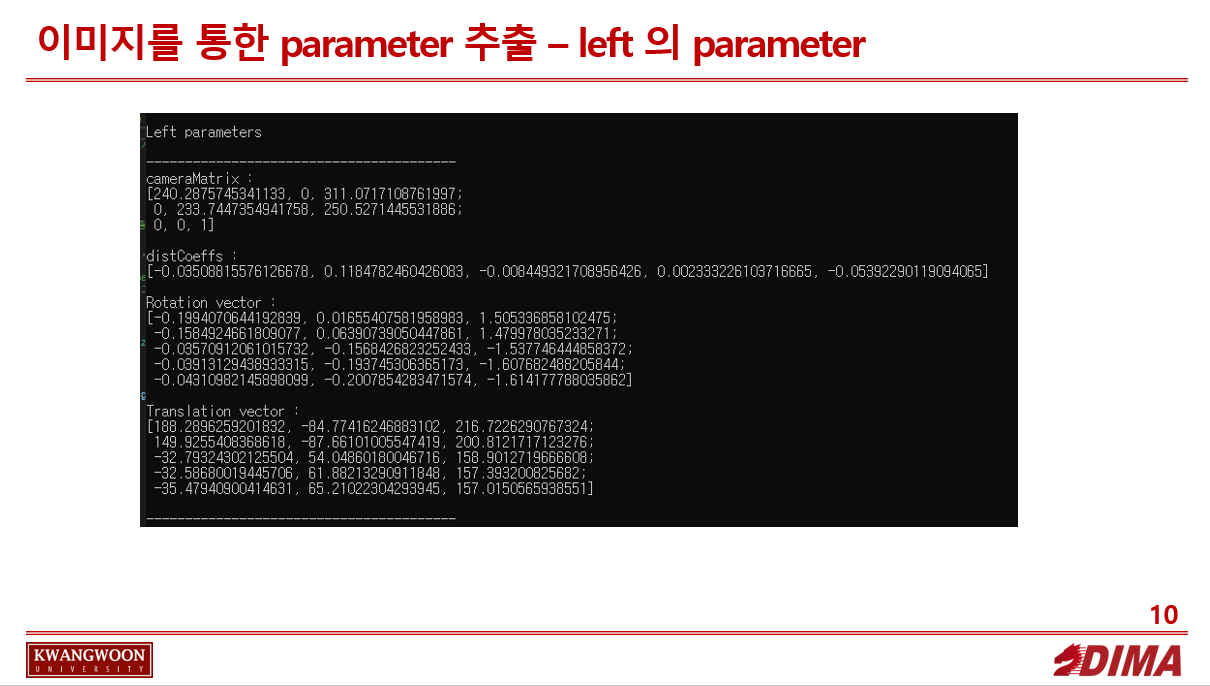
결과

CODE - calibration
#define _CRT_SECURE_NO_WARNINGS

#pragma warning(disable:4996)
#include <opencv2/opencv.hpp>
#include <opencv2/calib3d/calib3d.hpp>
#include <opencv2/calib3d/calib3d_c.h>
#include <opencv2/highgui/highgui.hpp>
#include <opencv2/imgproc/imgproc.hpp>
#include <stdio.h>
#include <opencv2/opencv_modules.hpp>
#include <librealsense2/rs.hpp>
#include <iostream>
#include <vector>


using namespace std;
using namespace cv;

int CHECKERBOARD[2]{ 5,7 };

int main()
{
	vector<vector<cv::Point3f> > objpoints_left;		//체스보드의 3D 포인트 저장 위해
	vector<vector<cv::Point2f> > imgpoints_left;		//체스브드의 2D 포인트 저장 위해

	vector<vector<cv::Point3f> > objpoints_right;		//체스보드의 3D 포인트 저장 위해
	vector<vector<cv::Point2f> > imgpoints_right;		//체스브드의 2D 포인트 저장 위해

	vector<cv::Point3f> objp_left;		//world coordinate define
	vector<cv::Point3f> objp_right;		//world coordinate define


	//스퀘어 사이즈 넣어야함
	for (int i = 0; i < CHECKERBOARD[1]; i++)
	{
		for (int j = 0; j < CHECKERBOARD[0]; j++)
		{
			//cout << j << endl;
			objp_left.push_back(cv::Point3f(j * 36, i * 36, 0));		//스퀘어 사이즈 곱... mm단위이므로 3cm 으로 잡음.		objp에 스퀘어 사이즈 만큼 채움
			objp_right.push_back(cv::Point3f(j * 36, i * 36, 0));		//스퀘어 사이즈 곱... mm단위이므로 3cm 으로 잡음.		objp에 스퀘어 사이즈 만큼 채움

		}
	}


	std::vector<cv::String> images;

	std::string path = "*.jpg";		//폴더 내에 확장자가 jpg인 이미지들 불러오기 위해 패턴으로 지정

	cv::glob(path, images);		//(패턴(.jpg), vector(결과를 담을))


	Mat frame, gray;
	vector<cv::Point2f> corner_pts_left;
	vector<cv::Point2f> corner_pts_right;

	bool success;

	for (int i = 0; i < images.size() / 2; i++)
	{
		frame = cv::imread(images[i]);		//각 이미지를 불러와 매트릭스에 담음
		cvtColor(frame, gray, cv::COLOR_BGR2GRAY);
		success = cv::findChessboardCorners(gray, cv::Size(CHECKERBOARD[0], CHECKERBOARD[1]), corner_pts_left, CV_CALIB_CB_ADAPTIVE_THRESH | CV_CALIB_CB_FAST_CHECK | CV_CALIB_CB_NORMALIZE_IMAGE);	//추후 수정
		//각기 다른 사진에 대하여 가장 적절한 코너를 찾음 corner_pts
		//(input 이미지, Size(row, columm), 2차원 탐지된 conor , 디폴트 값)
		//리턴 값은 코너가 감지되었을 시1, 아니면 0

		if (success)		//코너가 감지되었을 때 시행되는 조건문
		{
			printf("left[%d] detected \n", i);

			TermCriteria criteria(CV_TERMCRIT_EPS | CV_TERMCRIT_ITER, 30, 0.001);
			//(타입, 맥시멈 iteratino 횟수, 알고리즘이 멈추었을 때 원하는 정확도

			cv::cornerSubPix(gray, corner_pts_left, cv::Size(11, 11), Size(-1, -1), criteria);
			//모서리 precise 하게 하기
			//(원본 이미지, 조정된 코너, 사이즈, search window의 절반, 디폴트, criteria)
			//criteria의 maxcount인 30이 되거나, 알고리즘이 멈추었을 때 원하는 정확도가 0.0001이 되면 cornersub 함수 종료


			cv::drawChessboardCorners(frame, cv::Size(CHECKERBOARD[0], CHECKERBOARD[1]), corner_pts_left, success);
			//체스보드에 예측한 corner_pts 그리기

			objpoints_left.push_back(objp_left);
			imgpoints_left.push_back(corner_pts_left);
		}


		cv::imshow(images[i], frame);

		if (cv::waitKey(0))
		{
			destroyAllWindows();
		}

	}

	cv::destroyAllWindows();
	Mat cameraMatrix_left, distCoeffs_left, R_left, T_left;
	calibrateCamera(objpoints_left, imgpoints_left, cv::Size(gray.rows, gray.cols), cameraMatrix_left, distCoeffs_left, R_left, T_left);
	//(3D 점의 벡터로 구성된 벡터, 2D 이미지 포인트의 벡터로 구성된 벡터, 이미지 크기, 내장 카메라 메트릭스, 왜곡 계수, ..)

	cout << "----------------------------------------" << endl;
	cout << "\nLeft parameters\n" << endl;
	cout << "----------------------------------------" << endl;

	std::cout << "cameraMatrix : \n" << cameraMatrix_left << "\n" << std::endl;
	std::cout << "distCoeffs : \n" << distCoeffs_left << "\n" << std::endl;
	std::cout << "Rotation vector : \n" << R_left << "\n" << std::endl;
	std::cout << "Translation vector : \n" << T_left << "\n" << std::endl;

	cout << "----------------------------------------" << endl;


	for (int i = images.size() / 2; i < images.size(); i++)
	{
		frame = cv::imread(images[i]);		//각 이미지를 불러와 매트릭스에 담음
		cvtColor(frame, gray, cv::COLOR_BGR2GRAY);
		success = cv::findChessboardCorners(gray, cv::Size(CHECKERBOARD[0], CHECKERBOARD[1]), corner_pts_right, CV_CALIB_CB_ADAPTIVE_THRESH | CV_CALIB_CB_FAST_CHECK | CV_CALIB_CB_NORMALIZE_IMAGE);	//추후 수정
		//각기 다른 사진에 대하여 가장 적절한 코너를 찾음 corner_pts
		//(input 이미지, Size(row, columm), 2차원 탐지된 conor , 디폴트 값)
		//리턴 값은 코너가 감지되었을 시1, 아니면 0

		if (success)		//코너가 감지되었을 때 시행되는 조건문
		{
			printf("right[%d] detected \n", i - 5);


			TermCriteria criteria(CV_TERMCRIT_EPS | CV_TERMCRIT_ITER, 30, 0.001);
			//(타입, 맥시멈 iteratino 횟수, 알고리즘이 멈추었을 때 원하는 정확도

			cv::cornerSubPix(gray, corner_pts_right, cv::Size(11, 11), Size(-1, -1), criteria);
			//모서리 precise 하게 하기
			//(원본 이미지, 조정된 코너, 사이즈, search window의 절반, 디폴트, criteria)
			//criteria의 maxcount인 30이 되거나, 알고리즘이 멈추었을 때 원하는 정확도가 0.0001이 되면 cornersub 함수 종료


			cv::drawChessboardCorners(frame, cv::Size(CHECKERBOARD[0], CHECKERBOARD[1]), corner_pts_right, success);
			//체스보드에 예측한 corner_pts 그리기

			objpoints_right.push_back(objp_right);
			imgpoints_right.push_back(corner_pts_right);
		}


		cv::imshow(images[i], frame);

		if (cv::waitKey(0))
		{
			destroyAllWindows();
		}

	}

	cv::destroyAllWindows();
	Mat cameraMatrix_right, distCoeffs_right, R_right, T_right;
	calibrateCamera(objpoints_right, imgpoints_right, cv::Size(gray.rows, gray.cols), cameraMatrix_right, distCoeffs_right, R_right, T_right);
	//(3D 점의 벡터로 구성된 벡터, 2D 이미지 포인트의 벡터로 구성된 벡터, 이미지 크기, 내장 카메라 메트릭스, 왜곡 계수, ..)


	cout << "----------------------------------------" << endl;
	cout << "Right parameters\n" << endl;
	cout << "----------------------------------------" << endl;

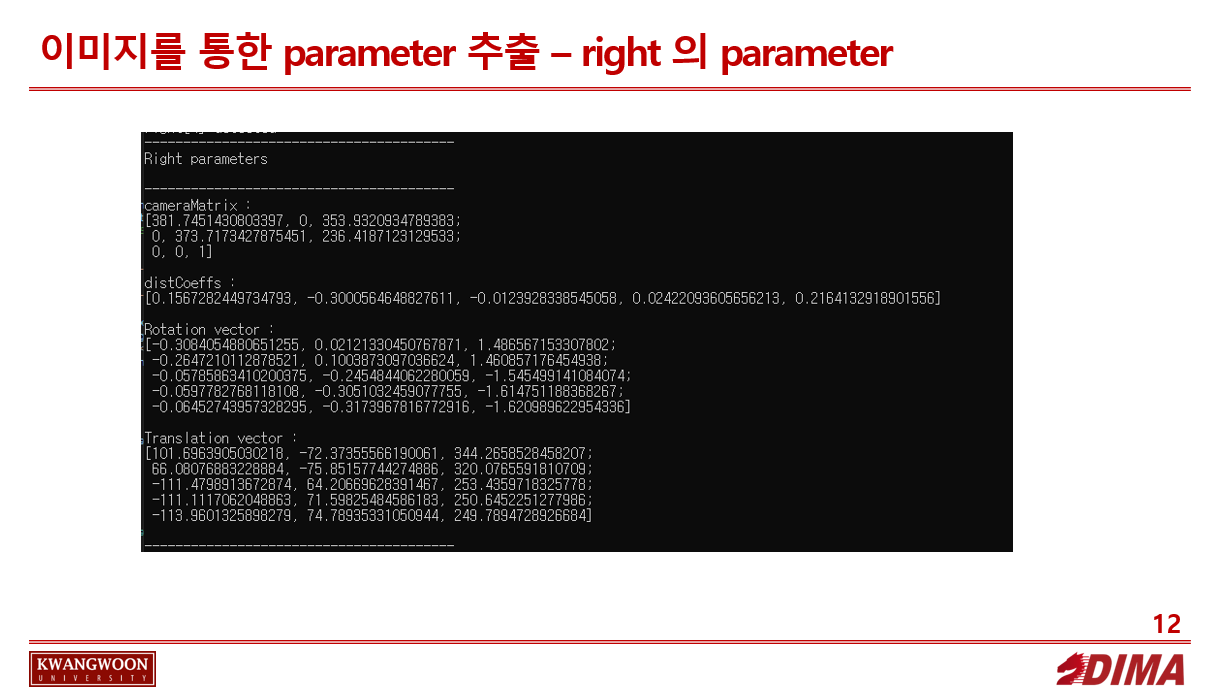
	std::cout << "cameraMatrix : \n" << cameraMatrix_right << "\n" << std::endl;
	std::cout << "distCoeffs : \n" << distCoeffs_right << "\n" << std::endl;
	std::cout << "Rotation vector : \n" << R_right << "\n" << std::endl;
	std::cout << "Translation vector : \n" << T_right << "\n" << std::endl;


	Mat R_stereo, T_stereo, E_stereo, F_stereo;


	cv::stereoCalibrate(objpoints_left, imgpoints_left, imgpoints_right, cameraMatrix_left, distCoeffs_left, cameraMatrix_right, distCoeffs_right, gray.size(), R_stereo, T_stereo, E_stereo, F_stereo,
		CALIB_FIX_ASPECT_RATIO +
		CALIB_ZERO_TANGENT_DIST +
		CALIB_USE_INTRINSIC_GUESS +
		CALIB_SAME_FOCAL_LENGTH +
		CALIB_RATIONAL_MODEL +
		CALIB_FIX_K3 + CALIB_FIX_K4 + CALIB_FIX_K5,
		TermCriteria(TermCriteria::COUNT + TermCriteria::EPS, 100, 1e-5));


	cout << "----------------------------------------" << endl;
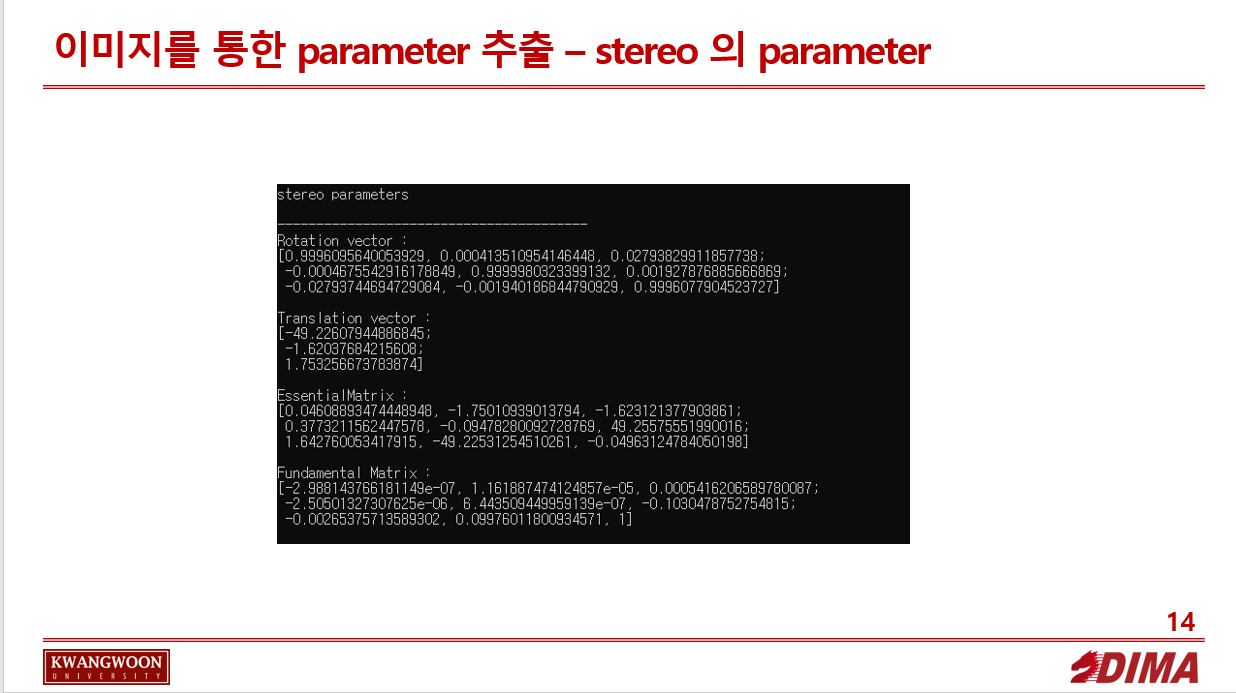
	cout << "stereo parameters\n" << endl;
	cout << "----------------------------------------" << endl;

	std::cout << "Rotation vector : \n" << R_stereo << "\n" << std::endl;
	std::cout << "Translation vector : \n" << T_stereo << "\n" << std::endl;
	std::cout << "EssentialMatrix : \n" << E_stereo << "\n" << std::endl;
	std::cout << "Fundamental Matrix : \n" << F_stereo << "\n" << std::endl;


	return 0;
}
결과
Subscribe via RSS